

Integrating a third-party identity verification provider takes four things: a server-side call to the provider’s API, a way to hold a user in a pending state while the check runs, a webhook or polling loop to receive the result, and an audit record of what was decided and why. The API call is the easy part and takes an afternoon. The other three are where integrations go wrong, and they are worth designing before you write any code.
What follows is the shape of a production integration rather than a quickstart, drawn from patterns the engineering team behind aIDentix has used across enterprise Angular and NestJS systems.
Where does the verification call belong?
Server-side, always. Never from the browser or mobile client.
Two reasons. Your API credentials cannot be exposed in a client bundle. And a verification result that arrives from a client you do not control is a verification result an attacker can forge. The client’s job is to capture the document image and the liveness video and hand them to your backend; your backend calls the provider.
The pattern that scales here is a dedicated connector layer rather than provider calls scattered through your services. In the shared-library architecture DSS built for a set of enterprise Angular and NestJS applications, external integrations were consolidated into a single connector library with a common interface, reusable service classes, centralised error handling and consistent data transformation across projects.
For identity verification specifically, that connector layer earns its cost quickly:
- Provider changes stay contained. Switching or adding a verification vendor touches one library, not every service that onboards a user.
- Error handling is uniform. A timeout, a rate limit and a genuine verification failure are three different events. Handled ad hoc, they get conflated, and users are told “verification failed” when the truth was “we could not reach the provider.”
- Data transformation happens once. Every provider returns a different shape. Normalising at the boundary means your domain model does not carry a vendor’s schema.
How do you hold a user while a check is running?
With an explicit state machine, not a boolean.
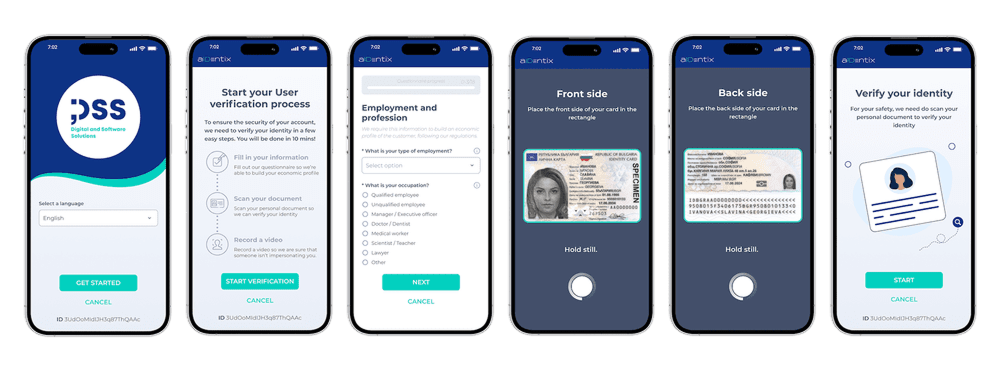
The common mistake is a verified flag on the user record. It cannot express the states you actually need: submitted, in review, requires resubmission, manually escalated, expired, rejected. Each of those needs different UI and different downstream permissions.
In the DSS shared-library work, this was solved with reusable workflow libraries providing predefined abstract models for workflow management, condition-based actions that trigger automatically, multi-step approval processes with dynamic rules, and configurable state transitions. Applied to verification, the mapping is direct: submission triggers the check, the provider’s response drives a condition-based transition, a low-confidence result routes into a manual approval step, and every transition is a recorded event rather than an overwritten field.
Build this before you launch. Retrofitting a state machine onto a boolean means migrating live user records, and you will be doing it under pressure because a compliance question prompted it.
How should authentication and permissions work around verification?
Verification status should gate authorisation, not authentication. A user can be authenticated and unverified — that is a normal, expected state, and it is the state most of your onboarding funnel lives in.
The architecture DSS used centralised this in paired libraries: a frontend integration handling JWT lifecycle, and a backend integration providing role-based access control, both built on Keycloak. Verification status becomes a claim or role that RBAC evaluates, which means the rule “unverified users cannot initiate transfers” is enforced in one place rather than re-implemented in each endpoint that needs it.
The failure mode this avoids is worth naming. When verification checks are written inline per endpoint, the endpoint someone adds next month will not have one. Centralised authorisation makes the check the default and the exemption explicit.
What do you need to log, and why is it not ordinary logging?
Verification events are regulatory records, not diagnostics. Application logs rotate; audit records must be retained, queryable and tamper-evident.
The pattern here is a separate audit stream. In the DSS libraries this was a reusable NestJS module publishing audit events to Kafka, with a structured logging format for analysis and configurable event topics — deliberately distinct from application logging, and consistent across every service that emitted events.
For an identity verification integration, the audit record should capture, at minimum:
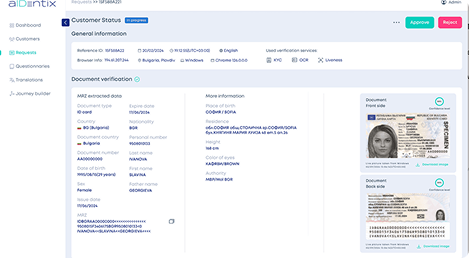
- Which checks ran, in which order, and the result of each — document authenticity, data extraction, face match, liveness, watchlist and PEP screening
- The provider’s confidence scores, retained rather than reduced to a pass or fail
- Any manual override, with the identity of the reviewer and the stated reason
- Timestamps for submission, provider response and final decision
- The version of the rules in force at the time of the decision
That last item is the one most integrations miss. When your risk thresholds change — and they will — you need to be able to explain a decision made under the previous configuration. Without a rules version on the record, a two-year-old approval becomes indefensible.
How do you handle failures without losing users?
Distinguish the three failure classes and treat them differently:
Provider unavailable. Retry with backoff, keep the user in a pending state, and tell them the truth. Do not surface this as a verification failure; the user did nothing wrong and telling them otherwise costs you the conversion.
Poor capture. Glare, blur, a cropped document, a failed liveness attempt due to lighting. This is the largest category and the most recoverable. Give a specific instruction — “the bottom edge of your document was cut off” beats “please try again” by a wide margin in completion rate.
Genuine verification failure. The document is not authentic, or the face does not match. Route to manual review rather than hard-rejecting. Legitimate users do fail automated checks, and an irreversible automated rejection is both a lost customer and, in several jurisdictions, a decision the user has a right to contest.
What about deployment and testing?
Two things are worth setting up early.
A sandbox path that exercises the full state machine. Most providers, aIDentix included, offer test credentials and documents that produce deterministic outcomes. Use them to drive every branch — including the ones you expect never to hit.
Dependency-aware builds if verification lives in a shared library. In the DSS monorepo setup, Nx tracked which applications were affected by a change and rebuilt only those, so a change to the shared connector rebuilt and redeployed its dependents rather than the entire workspace. When a verification library is consumed by several applications, this is the difference between a small change being a small deployment and a small change being a full release.
A realistic sequence
- Define the verification states and transitions your product actually needs — before choosing a provider.
- Build the connector layer with normalisation and error classification at the boundary.
- Wire verification status into your existing authorisation model as a claim, not an inline check.
- Stand up the audit event stream, separate from application logging, with rules versioning.
- Integrate the provider API behind the connector.
- Drive every state through sandbox credentials, including the failure branches.
- Instrument drop-off by state, so you can see where real users are losing patience.
Steps one to four are provider-independent. If you build them first, swapping providers later is a configuration change instead of a rewrite — which is the position you want to be in, whichever vendor you start with.
aIDentix exposes document capture, OCR extraction, liveness and face matching, configurable KYC questionnaires and database screening through a single API, with documentation covering the states described above. It is built by DSS, whose engineering teams have delivered the shared-library and workflow architecture referenced here across enterprise Angular and NestJS systems.
Frequently asked questions
How do I integrate third-party identity verification into my website?
Call the provider from your server, never from the browser or mobile client. The client captures the document image and liveness video and passes them to your backend; the backend calls the provider. A result arriving from a client you do not control is a result an attacker can forge.
Should identity verification status be a boolean field?
No. Use an explicit state machine. A boolean cannot express submitted, in review, requires resubmission, manually escalated, expired or rejected, and each of those needs different UI and different downstream permissions. Retrofitting a state machine onto a boolean means migrating live user records.
What should an identity verification audit log contain?
Which checks ran and each result, the provider’s confidence scores retained rather than reduced to pass or fail, any manual override with reviewer identity and reason, timestamps for submission, response and decision, and the version of the rules in force at the time. Rules versioning is the item most integrations miss.
How should failed verifications be handled?
Distinguish three classes. Provider unavailable: retry with backoff and keep the user pending. Poor capture: give a specific instruction, since this is the largest and most recoverable category. Genuine failure: route to manual review rather than hard-rejecting, because legitimate users do fail automated checks.
Can identity verification support customizable workflows?
Yes, if it is built on condition-based transitions rather than inline checks. A low-confidence result routes into a manual approval step, each transition is recorded as an event rather than an overwritten field, and verification status is evaluated by your existing authorisation model as a claim.